• Skip to main content
  • Skip to primary sidebar

Training for Translators

Classes for translators and interpreters

  • Start here
  • Blog
  • Classes
    • Coaching for freelancers
    • Subscription
  • Books
    • Translate my books
    • Book Shop
  • About/Contact
    • Privacy Policy
  •  
  • Account

LinkedIn

Feb 17 2017
Corinne McKay

The LinkedIn “foot in the door” strategy

This is a guest post by Maryam Abdi. Maryam is a registered Somali court interpreter and the owner of Expert Somali Translations, a boutique firm offering Somali > English translations and cultural consulting services to legal and government sectors. She is the creator of Translators Academy where she blogs about marketing, sales and career strategies for aspiring and new freelance translators. Maryam holds a Bachelor’s degree in political science from the University of California, San Diego. She is a recipient of the State Bar of California’s Wiley M. Manuel Award for Pro Bono Legal Services, for her volunteer work as an interpreter and translator for victims of human rights abuses. 

If you’re a freelance translator looking for new clients, the days of bidding on translation job portals and arbitrarily cold-calling translation agencies are over. It’s not a numbers game anymore. Clients these days expect you to spend the time to learn about them before getting in contact. And what’s the best way to do that? The answer is LinkedIn. LinkedIn is nothing short of a goldmine for freelance translators. It’s an incredible tool to learn about prospects, grow your network and find high-quality and well-paying clients. When used correctly, it can create endless work opportunities.

In this blog post, we’re going to dig deep and explore how freelance translators can:

  • Authentically connect with other translators working with their ideal clients
  • Expand their network to get access to translation projects that never get advertised
  • Use the Foot in the Door Strategy to leverage their network and get introductions to “pre-sold” potential clients.

By harnessing the power of LinkedIn, you’ll be well on your way to setting up a well-organized translation sales system that you can maintain in as little as five hours a week.

The step-by-step method to building your high-end LinkedIn network from scratch

Is there a particular translation agency or company you want to work with? But you’re unsure how to go about it? The most effective way to getting in the potential client’s inner circle is to use the Foot in the Door Strategy. It’s a simple, three-step process that you can implement right away on LinkedIn. This is a highly methodical approach that deconstructs the often-confusing prospecting process. It begins with finding other translators who are already working with your ideal clients and translation agencies.

maryam1

The LinkedIn Advanced People Search tool helps you find the right translators to contact. You can search for translators by their language pairs, specialization and the companies they work with. Here’s the step-by-step process to filling out each field of the Advanced People Search tool:

  • Start with the keywords field and type in the specialization of the translators you want to connect with. If you’re interested in flexible translation positions, this is a great place to enter the keyword “freelance”.
  • To find translators working in similar language pairs as you, enter the preferred languages in the title field. For example, if you’re searching for French <-> English translators you could insert, “French English translator.”
  • Next, enter the name of the agency or potential direct client in the company field. For many translators who don’t populate this field, their search results become limited.
  • In the Advanced People Search tool, you can also filter the results by relationship. A “1st connection” is someone that is already in your network. Assuming you want to find a translator outside of your network, click on the remaining options (2nd connections, Group members and 3rd connections + Everyone else).
  • The next step is to narrow your search by location. Enter your city to find local translators working with your ideal clients.

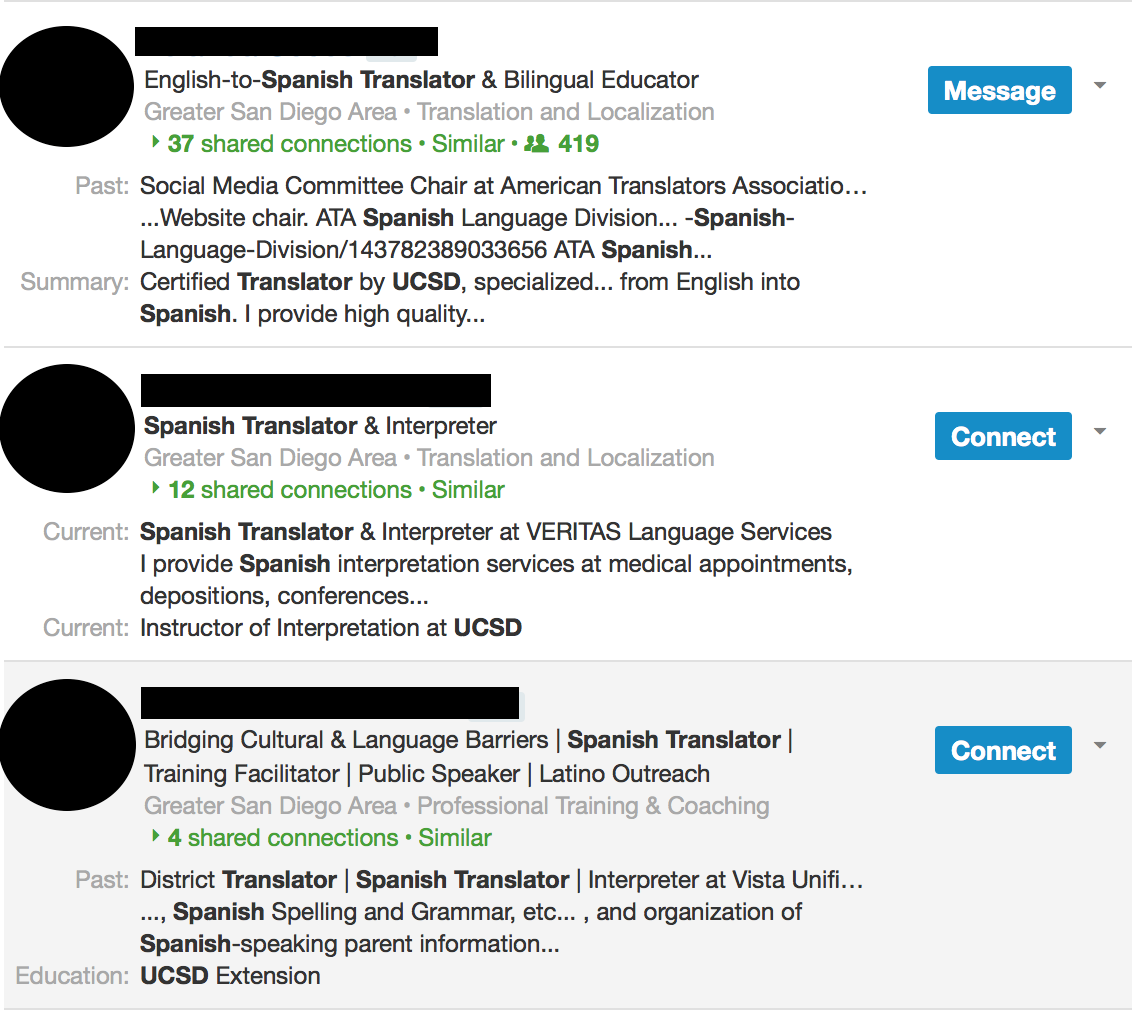
Once you complete the form, click on the search button to get a list of translators with the information you specified. You can experiment with the Advanced People Search tool to find the specific person you want to contact.
 

maryam2

After you review the search results, the next step is the “research phase” where you’ll collect information on the translators working with the translation agencies and companies on your prospecting list. Before you contact them, do your homework so you don’t come off impersonal in your approach. Once you’ve found the translators that have a relationship with your ideal clients and you review their profile, now it’s time to find a way to connect with them on LinkedIn.The easiest way to connect with freelance translators working for your ideal clients and agencies is to find a connecting factor. Before you can send them a message you have to demonstrate how you know them. For example, you can connect with a translator who went to the same university or translation programs as you. You could also search by translation association membership or perhaps comb through their profile to see if they have listed their personal email. Either way, you need this information to not only “warm up” your message but to add them to your personal network on LinkedIn. It’s best to reach out to translators who have the same specialization as you or work in complementary language pairs. For example, if you’re a Spanish > English translator find an English > Spanish translator.

Now that I’ve showed you how to find the translators working with your ideal clients, it’s time to authentically contact them with a personalized invitation to connect on LinkedIn. If you’re wondering what to say, you can use the tested word-for-word script below to connect with translators the right way. By using this script you can shave off weeks if not months on your search for new clients.

The word-for-word script to help you find new clients faster

Finding new clients is a lot easier once you leverage the network of your existing clients and colleagues and it all begins with the Foot-in-the-Door Strategy. Here’s a sample message you can use to invite a freelance translator to connect on LinkedIn. Unlike a generic message, this one is personalized and has a high response rate.

maryam_email

Don’t worry about sending this type of message and being met with deaf ears. It’s different from the typical cold emails sent by most freelance translators because:

  • The focus is shifted from you to them and it doesn’t come off as self-serving
  • You’re asking freelance translators to share their story instead of asking for a handout
  • You’re showing you’ve invested some time in getting to know them

This is a much easier way to find new clients without going to random networking events, cold-calling or running expensive advertisements in trade journals.

Building a relationship and requesting an introduction

Once your connection request on LinkedIn is accepted, it’s time to ask for the translator’s insight on the company you’re interested in. You can conduct your informational interview over email, by phone, or even in person if the fellow translator is in the same city as you. During your interview, ask open-ended questions about their experience working with the translation agency or company, the type of projects they work on, and their likes and dislikes about the client you’d like to work with. It’s very important to vet companies and agencies to make sure they’re a good fit for you and your translation services. When it comes to clients, quality is better than quantity. Naturally, the conversation will bounce back to you. In most cases, the translator will ask about your experience. Use this as an opportunity to express your interest in working with the agency or company and ask for an introduction.

However, it doesn’t end there. The point is to make it as simple as possible to get a warm introduction. Just like you, they’re very busy professionals and crafting an email to refer you will be one more thing on their to do list. Make sure to do the “heavy lifting” for them and offer to write the introduction message for them.

Lather, rinse, repeat

It’s often said your network is your net worth and I couldn’t agree more. Freelancing is a business built on relationships. Having the right network of translators will give you access to the well-paying translation projects that never get advertised. If you want to stay top-of-mind when the opportunity arises, stay in touch with translators in your network. Make sure to follow up with the translator after your talk or meeting. Send them a message genuinely thanking them for their time. If they gave you suggestions, tell them you’ll apply the strategies and keep them in the loop with your results. Remember, you also want to nurture your network. You have to give in order to receive and that involves referring your colleagues and presenting them with opportunities to tap into your clientele as well.

The Foot in the Door Strategy isn’t something you only do when you’re in desperate need of clients. Similar to exercising, it’s something you should do consistently in order to see results. Building a network is not easy, but the potential payoff is huge. With time you’ll be able to build the confidence and credibility to approach fellow translators and colleagues on LinkedIn. Eventually, you’ll get faster, more creative and self-assured the more you use the Foot in the Door Strategy.

Now I want to hear from you. Tell me about your experience using LinkedIn to find new clients by sharing your thoughts in the comments below.

Written by Corinne McKay · Categorized: Guest posts, Marketing, Uncategorized · Tagged: finding clients on LinkedIn, LinkedIn, marketing on LinkedIn, Maryam Abdi

Oct 13 2016
Corinne McKay

LinkedIn connections: what’s your strategy?

One of my goals for this quarter is to make better use of LinkedIn; I feel like it’s an underutilized tool for freelancers, and I want to explore its usefulness for my own purposes and for some students who’ve asked me about it. But here’s a fundamental question about your LinkedIn presence: how do you decide whose connection requests to accept or ignore?

Back in the day (let’s say before 2014 or so), my rule for LinkedIn connection requests was fairly rigid and fairly straightforward: if I don’t know you, and you don’t write a personal message saying how you know me, I don’t accept your request. My feeling was that there was little value in being connected to complete strangers on LinkedIn. Then, things changed in a few ways. Most problematically, LinkedIn now makes it harder to send a personal message (in place of the standard “I’d like to add you to my professional network on LinkedIn”), even if you want to. For example if you simply click on a connection that LinkedIn suggests, your connection request is automatically sent; you have to first click through to the person’s profile if you want to send a personal message along with your request.

As a result, I’ve relaxed my strategy over the years. I now accept most requests from people who already have a number of shared connections with me, and who work in the T&I industry in some capacity. On the positive side, I actually enjoy the status updates feature of the LinkedIn home page (where you can see what your connections have recently posted), and the updates are a lot more interesting when you have a lot of connections. The downside is that I’ve now amassed over 1,500 LinkedIn connections, many (or even most) of them to people who I know nothing about, except that they seem to be translators or interpreters and sent me a connection request. This gets problematic when I get an introduction request from someone else (“Can you refer me to this person?”), or a request for information about one of my connections (“What’s this person like to work with?”).

So, I feel like I’m in a bit of LinkedIn limbo: I don’t see the appeal of the LION (LinkedIn open networker) strategy, but I also feel that the days of restricting one’s LinkedIn network only to people with whom one has a personal connection are probably over. Any other thoughts on the pluses and minuses of this?

Written by Corinne McKay · Categorized: Social networking, Technology · Tagged: LinkedIn, LinkedIn connection strategy

Aug 28 2014
Corinne McKay

Handling LinkedIn connection requests

I often refer to LinkedIn as the most underused social media resource out there: most of us have a LinkedIn profile, but we just “set it and forget it,” rather than using the site’s more sophisticated capabilities. At the very least, LinkedIn is a great way to connect with people in your target industries, by joining Groups that they also belong to (direct client 101: you don’t find them if you only hang out with other translators). You can also use LinkedIn saved searches–even with the free account–to keep track of business prospects. You can use LinkedIn like a virtual Rolodex so that you’re not scrabbling through your desk drawer for the business card of someone you met at a conference five years ago. LinkedIn is also really useful for doing research about your potential clients: finding out who’s hiring, who changed jobs, and so on.

But first, you have to contend with the sticky issue of how to handle LinkedIn connection requests. When I first joined LinkedIn, I was pretty liberal about who I connected with, theorizing that anyone who worked in our industry was potentially a good connection. Over the years (and many hundreds of connections later), I’ve become less of an “open networker,” so I only accept connection requests from a) people I know or b) people who personalize their connection request message and explain how we know each other or why they want to connect with me. If I don’t know the person outside LinkedIn and they don’t explain why they want to connect, I hit “Ignore” and then “I don’t know John Doe,” because I see little value in these types of blind connections.

“But LinkedIn just sends the connection request automatically!,” I hear you cry…”It’s gone before I can personalize it!” Well, not if you do it the right way. Yes, if you’re just looking at LinkedIn’s list of “People You May Know,” and you click the “Connect” button, there goes the invitation with the stock message “I’d like to add you as a connection on LinkedIn.” However if you are looking at the profile of the person you want to connect with, and then you click Connect, you’ll get this popup:
ATA_LinkedIn

Then, you can indicate how you know the person, and you can write them a personal message. Everyone has to come up with their own LinkedIn strategy: some people will connect only with people they personally know and work with, while others are open to networking with anyone who hits the Connect button. But personalizing your connection request looks more professional and will undoubtedly result in a greater success rate than mass-connecting anonymously.

Written by Corinne McKay · Categorized: Freelancing, Professional associations, Social networking, Technology · Tagged: LinkedIn, online networking, social media

Feb 24 2010
Corinne McKay

A few LinkedIn tips

On Monday evening, Eve Bodeux, Riccardo Schiaffino and I presented a professional development session on “Social Media: Web 2.0 for Translators” for the Colorado Translators Association. I covered LinkedIn and Facebook, Riccardo handled Blogging 101 (you can download Riccardo’s excellent presentation from his website link above) and Eve wrapped things up with Twitter. Given that we covered all of this in an hour and a half, it was a very brief introduction to these topics. However, as one attendee commented, “I feel like for now I can get away without using these technologies but I can’t get away without knowing what they are,  and now I know,” which I thought was a good observation.

My overview of LinkedIn was just that (an overview) without any power-user tips, but I thought I’d share a few suggestions for sprucing up your LinkedIn profile and controlling who can view your information. Feel free to add your own tips too!

-To create a customized link for your LinkedIn public profile (the view of your profile that other people see), click “Profile” and then in the blue shaded box
at the top, look for the line that says “Public Profile.” Then click the “Edit” link at the end of that line. This allows you to change your profile URL from www.linkedin.com/pub/abunchofrandomcode to www.linkedin.com/in/yourname , for example.

-To see how many people have viewed your LinkedIn profile and how many times you have appeared in LinkedIn search results, click “Home” and then look down the
right sidebar for the blue “Who’s viewed my profile” box. If you have the basic (free) LinkedIn account, you can’t see much information about the people who viewed your profile but it is interesting to see how your profile views increase or decrease over time. On a side note, Viadeo (a LinkedIn-esque site directed at Europeans) shows you the identity of everyone who views your profile even if you have a free account.

-To control who can see your profile photo, click “Settings” (this is not in the main navigation bar, it’s in the small grey type in the upper right hand corner
next to where it says “Welcome, Your Name”. Once you are in “Settings,” click “My Profile Photo” and then select either “My Connections,” “My Network” or
“Everyone.” A few people at the session were concerned about the general public being able to see their photo. If this applies to you, I would either restrict your photo to only your connections or upload something other than your photo (i.e. make a .jpg of your company name or create a professional-looking avatar of yourself).

-To control who can see your status updates, do as above but click “Status Visibility” and then select an option. Personally, if you are using LI for networking/marketing purposes, I would recommend making your status visible to everyone on the site. I do this, and I am just careful never to say anything that I would not want the whole world to know, such as my physical whereabouts, client gripes, etc. In my experience, more people view your profile if they can read your status updates (and of course if your status updates are interesting).

-To add various outside elements  such as your blog, presentations, travel schedule, etc.  click “Profile” and then scroll down until you see “Applications.” Click that link and you will see a bunch of options; I use the WordPress application to feed my blog into my LinkedIn profile. I think that this keeps my profile looking fresh without much effort on my part.

Written by Corinne McKay · Categorized: Social networking, Technology · Tagged: LinkedIn

Primary Sidebar

Subscribe to the Training for Translators mailing list!

Getting Started as a Freelance Interpreter: Available now in print and electronic editions

Learn from our blog:

  • Should you raise your rates? Now? How?
  • Why most language company content misses the mark, and a few strategic fixes
  • Struggling in your freelance business? Really, you have four options
  • T4T podcast, episode 30: A summary of my “state of freelance translation” survey
  • Survey results: The state of freelance translation in 2026
  • Focus on the clients who can afford you
  • Upcoming direct client marketing class
  • Travel: Cycling Quebec’s Tomifobia Nature Trail

Search the Training for Translators blog

Copyright © 2026 · Training For Translators · Log in

This website uses cookies to improve your experience. We'll assume you're OK with this, but you can opt-out if you wish. To view this website's privacy policy, click About>Privacy Policy. Accept Read More
Privacy & Cookies Policy

Privacy Overview

This website uses cookies to improve your experience while you navigate through the website. Out of these, the cookies that are categorized as necessary are stored on your browser as they are essential for the working of basic functionalities of the website. We also use third-party cookies that help us analyze and understand how you use this website. These cookies will be stored in your browser only with your consent. You also have the option to opt-out of these cookies. But opting out of some of these cookies may affect your browsing experience.
Necessary
Always Enabled
Necessary cookies are absolutely essential for the website to function properly. This category only includes cookies that ensures basic functionalities and security features of the website. These cookies do not store any personal information.
Non-necessary
Any cookies that may not be particularly necessary for the website to function and is used specifically to collect user personal data via analytics, ads, other embedded contents are termed as non-necessary cookies. It is mandatory to procure user consent prior to running these cookies on your website.
SAVE & ACCEPT